Last Updated on September 7, 2025

Key Takeaways
- Digital copiers have replaced analog models as the industry standard, offering superior speed, quality, and network connectivity for modern offices
- Multifunction Printers (MFPs) dominate the market by combining copying, printing, scanning, and faxing in one device, reducing costs and space requirements
- Security features are now essential, with modern copiers requiring data encryption, user authentication, and secure print release to protect business information
- Volume assessment is critical – choose a machine with a monthly duty cycle exceeding your calculated volume by 15% to ensure longevity and performance
- Get expert guidance from The Copier Guy for reliable photocopier solutions tailored to your business needs in KL and Selangor – get your quote here
The photocopier has transformed dramatically from Chester Carlson’s 1938 invention in a Queens laboratory to today’s sophisticated digital hubs.
What began as a solution to eliminate tedious manual document duplication has evolved into an essential component of modern business infrastructure.
For Malaysian businesses seeking the right photocopying solution, understanding the different types and features available is crucial for making an informed decision that supports your operational efficiency and growth.
Engaging Podcast Version
The Evolution from Simple Duplication to Smart Integration
The journey from analog to digital represents more than just technological advancement—it’s a fundamental shift in how businesses handle document workflows.
The introduction of digital copying technology enabled scanning a document once to create a digital image that can be printed multiple times, revolutionizing office productivity and paving the way for integrated multifunction devices.
This evolution has been particularly significant for Malaysian SMEs and corporate offices, where efficient document management directly impacts operational costs and productivity.
The shift to digital has enabled features that were unimaginable in the analog era: network connectivity, mobile printing, and advanced security protocols.
Also Read: Office Printer & Copier Trends
Types of Photocopiers: Understanding Your Options

Analog Photocopiers
While largely phased out of production, analog copiers still exist in some environments. These machines rely on light and mirrors to directly project and duplicate a document’s image onto a photosensitive drum. However, they come with significant limitations:
Advantages:
- Simple operation
- Lower initial cost
Disadvantages:
- Slow copying speeds
- Poor image quality
- Prone to mechanical failures
- No modern connectivity features
- Limited paper handling capabilities
Best for: Very basic, low-volume personal use (though digital alternatives are recommended)
Digital Photocopiers
Digital copiers have become the industry standard, offering substantial improvements over analog technology. They operate like a scanner and printer combination, first creating a digital image of the document and then printing that image.
Key Benefits:
- Significantly faster copy speeds
- Superior image quality
- Higher paper capacity
- Better reliability
- Foundation for network integration
- Available in monochrome and color models
Best for: Small to medium offices with moderate copying needs
All-in-One Multifunction Printers (MFPs)
MFPs represent the most versatile and popular solution for today’s Malaysian businesses. These devices seamlessly combine the functions of a photocopier, printer, scanner, and fax machine into a single, cohesive device.
Strategic Advantages:
- Space optimization: Consolidates multiple devices into one
- Cost efficiency: Lower total cost of ownership through reduced maintenance and management
- Workflow integration: Functions as a central hub for document processes
- Enhanced connectivity: Full network integration and mobile capabilities
Best for: Most modern office environments, from startups to established corporations
Read More: Advantages & Disadvantages of Multifunction Printer
Wide-Format and Specialized Copiers
These machines serve specific industry needs requiring large-scale output. They are essential tools for industries such as architecture, engineering, and construction, where they produce large documents like blueprints and architectural plans.
Best for: Architecture firms, engineering companies, construction businesses, and design studios
5 Essential Features for Modern Malaysian Businesses
1. Performance Specifications
Copy Speed and First Copy Out Time
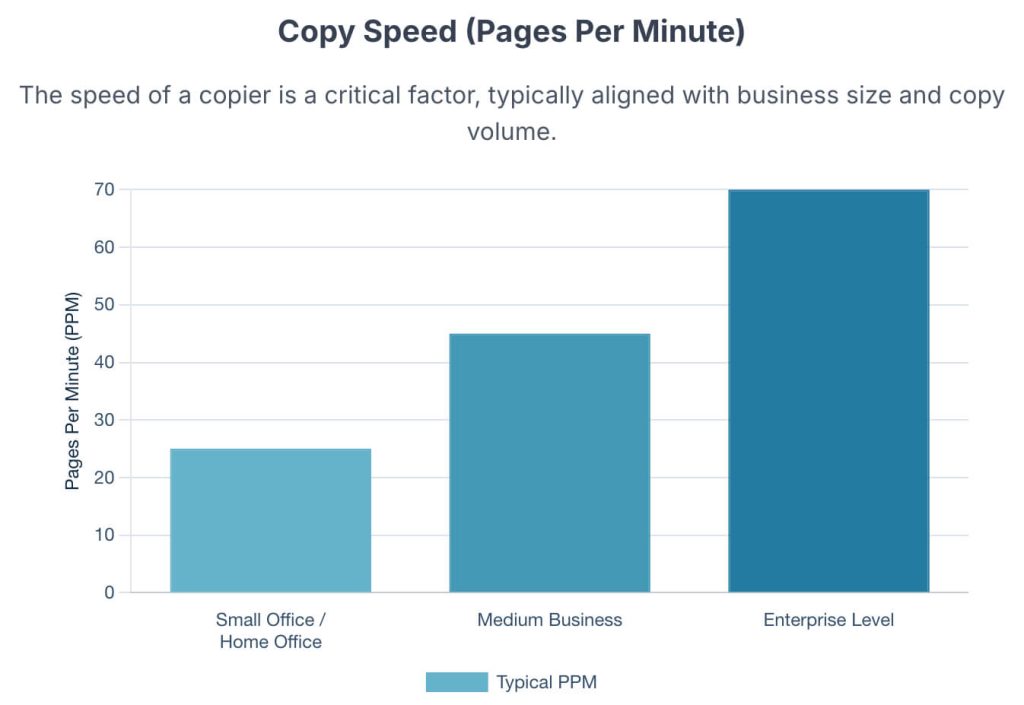
Copy speed, measured in pages per minute (ppm), is crucial for high-volume environments. Most offices find that a speed of 20 to 50 ppm meets their needs, while first copy out time is important for low-volume users.
Resolution Quality
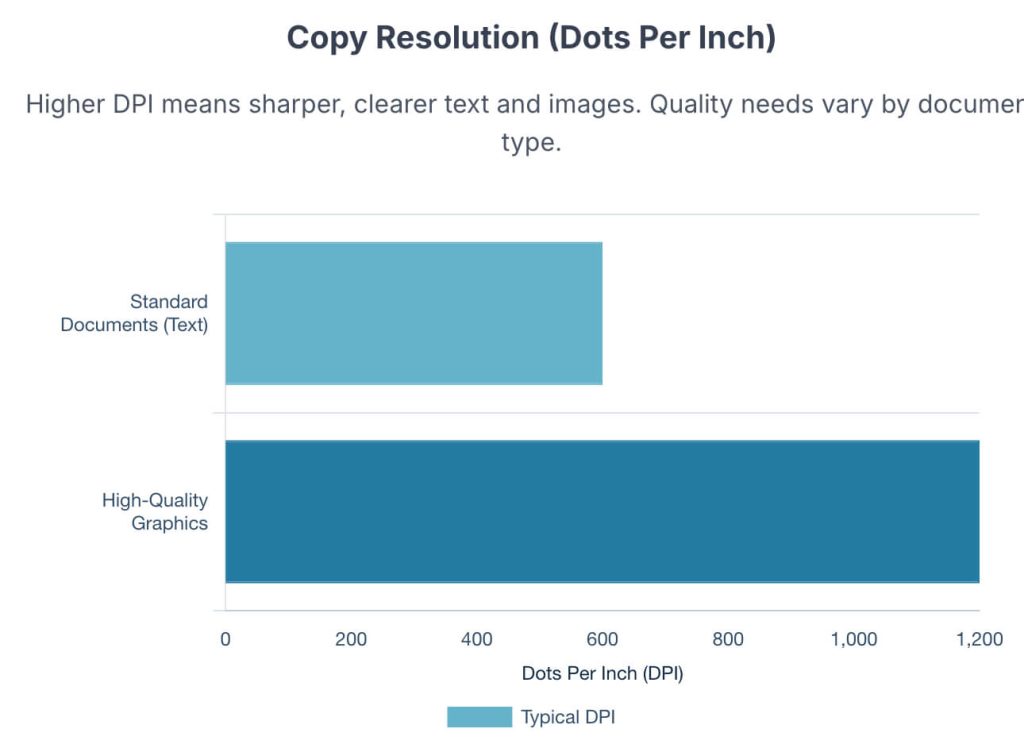
Resolution, measured in dots per inch (DPI), determines image clarity. For general documents and photos, 300 DPI is widely accepted for high-quality printing, while 600 DPI is considered high-resolution for detailed graphics.
2. Paper Handling Capabilities
Automatic Document Feeder (ADF)
An ADF automates the copying or scanning of large document stacks, essential for busy Malaysian offices processing multiple documents daily.
Duplexing
Duplexing enables automatic printing, copying, or scanning on both sides of paper, resulting in substantial paper consumption reduction and contributing to corporate sustainability goals.
3. Network Integration and Connectivity
Modern copiers must integrate seamlessly with your business’s IT infrastructure. Key connectivity features include:
- Network connectivity for shared office access
- Mobile printing capabilities for smartphones and tablets
- Cloud integration for direct scanning to cloud storage
- Email scanning for instant document distribution
4. Critical Security Features
Security is no longer optional—it’s essential. Modern MFPs are complex, network-connected computers with hard drives, operating systems, and memory, making them significant cybersecurity risks.
Essential security features include:
- Data Encryption: Encrypts data stored on the hard drive and protects data transmitted over the network
- User Authentication: PIN, ID card, or biometric access control
- Secure Print Release: Holds print jobs until user authentication at the machine
- Regular Firmware Updates: Patches vulnerabilities like any network device
- Hard Drive Wiping: Thorough data erasure before disposal or return
5. Advanced Finishing Options
For businesses producing professional documents, finishing options can eliminate outsourcing costs:
- Automated stapling
- Hole-punching for binder-ready documents
- Booklet-making for brochures and manuals
These accessories represent a trade-off between higher initial cost and long-term operational savings by eliminating the need to outsource professional print jobs.
Choosing the Right Photocopier for Your Malaysian Business
Volume Assessment
The most critical factor is determining your monthly copy volume. Choose a machine with a monthly duty cycle that exceeds your calculated volume by at least 15% to allow for future growth and avoid premature wear.
Top Brands Of Photocopy Machines
Deciding what copier to buy can be a bit overwhelming because there are so many brands of copiers and even more models made by said brands.
So here are a few reliable brands and some of their models that can aid your decision:
FUJI XEROX
Fuji Xerox is an American household brand and company known for its wide range of copy machines. One of its most popular models is the Xerox 560 Photocopier.
See the list of popular Fuji Xerox Copiers.
FUJIFILM
In 2021, Fuji Xerox was renamed FUJIFILM Business Innovation, which is the company’s division for office solutions, including photocopiers. The product line includes a range of multifunction printers and digital presses designed for offices of all sizes.
See the list of popular Fujifilm Copiers.
RICOH
Ricoh is an excellent service provider for great printers and copiers. They provide valuable services, and their copiers are very cost-effective.
Ricoh SP 5300DN laser printer is one of the best picks for its high-volume capabilities and low running costs. Many also seek it out for its speed, print quality, USB printing options, and security features.
See the list of popular Ricoh Copiers.
CANON
This is a Japanese company that was one of the pioneers of the copier. As a result, it is very popular in the field of photocopying.
A few examples of their machines are Canon Imagerunner Advance Multifunction Copiers- C3530i and Canon Multifunction A3 Copiers – Imagerunner Advance C3525i.
KONICA MINOLTA
Konica Minolta is a Japanese company that has been in the copier-making business since 1960. Uniquely, its copiers are sold under one platform called “Bizhub,” such as its multifunction Bizhub C750i copier.
SHARP
Sharp is a Japanese company that has been around since 1912 but got into the copier business in 1972.
Some of their best copiers include Sharp Ar 6031n A3 All-in-one Desktop Photocopier and Sharp Colour Digital Multifunction Copier – Mx 315nv.
TOSHIBA
This is another Japanese company established in the late 19th century. It is a forerunner in the copier industry.
One of their commonly found copiers includes the Toshiba Studio 232 Photocopier Machine.
Business-Specific Recommendations
| Business Type | Monthly Volume | Recommended Type | Key Features | Considerations |
|---|---|---|---|---|
| Small Office/SOHO | <10,000 pages | Compact MFP | Wireless connectivity, basic security | Focus on size and operational costs |
| SME Office | 20,000-40,000 pages | Full MFP | Duplexing, ADF, network connectivity | Evaluate security features and TCO |
| Corporate Department | >75,000 pages | High-volume MFP | High speed, advanced security, finishing | Robust duty cycle and variety of media support |
| Specialized Business | Varies | Wide-format copier | Large-format printing, high resolution | Industry-specific requirements |
Total Cost of Ownership Considerations
While initial purchase or lease price matters, consider the complete picture:
- Ongoing consumable costs (toner, paper)
- Maintenance contract expenses
- Energy consumption
- Staff productivity impact
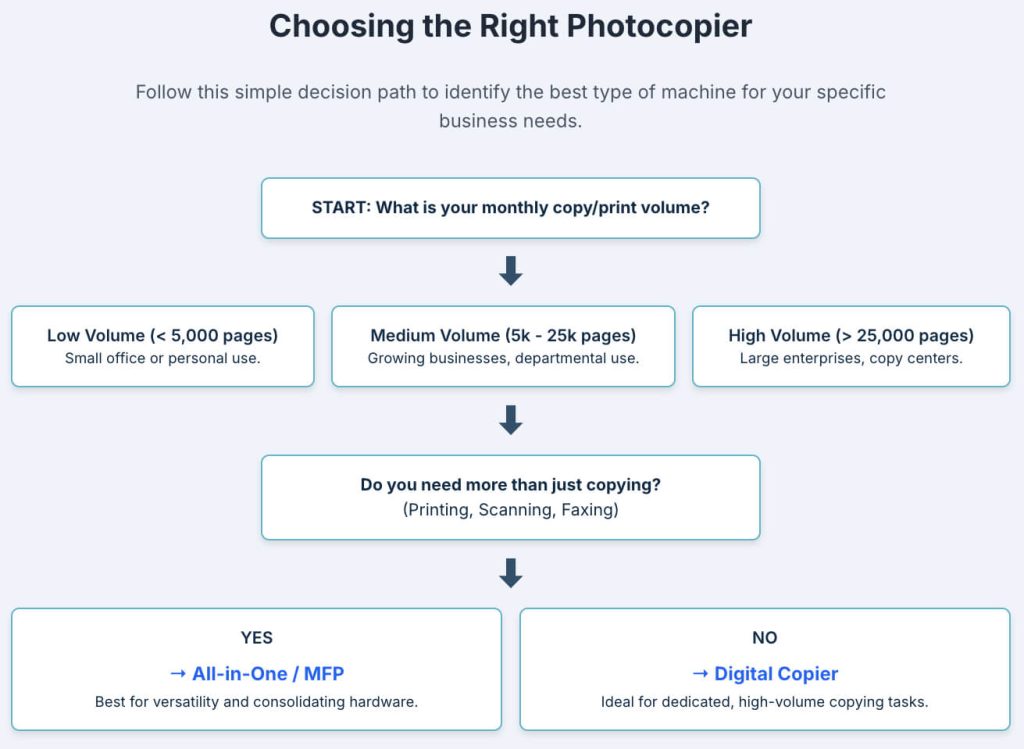
Which Photocopier Do You Need?
Picking the right photocopier for your business or home office can sometimes be overwhelming, so here are some things you should consider when making that decision.

The Future of Photocopying Technology
The evolution continues with increasing focus on software integration and cloud connectivity. Managed print services are becoming a key trend, allowing businesses to centralize control over printing and document workflows while reducing operational costs.
For Malaysian businesses, this means greater opportunities for operational efficiency and cost control through intelligent document management systems.
Making the Right Choice for Your Business
Selecting the right photocopier requires balancing current needs with future growth plans. Consider your monthly volume, required features, security needs, and total cost of ownership.
The investment in the right machine pays dividends through improved productivity, reduced outsourcing costs, and enhanced document security.
Whether you’re an event organizer needing flexible short-term rentals, an SME owner seeking cost-effective solutions, or an office manager requiring reliable high-volume performance, the right photocopier can significantly impact your business operations.
FAQs
What are the key advantages of digital copiers over analog models?
Digital copiers offer superior speed, image quality, paper capacity, reliability, and network integration compared to analog models.
Why are Multifunction Printers (MFPs) popular in modern offices?
MFPs combine copying, printing, scanning, and faxing in one device, reducing costs and space requirements while enhancing workflow integration and connectivity.
Why are security features essential in modern copiers?
Modern copiers require data encryption, user authentication, and secure print release to protect sensitive business information
How do I choose the right photocopier based on volume?
Choose a machine with a monthly duty cycle exceeding your calculated volume by 15% to ensure longevity and optimal performance.
Ready to find the perfect photocopier solution for your Malaysian business?
The Copier Guy offers comprehensive copier rental and purchase options with expert guidance tailored to your specific needs. From daily event rentals to long-term corporate solutions, we provide reliable Fuji Xerox, Fujifilm and Ricoh machines backed by our 4-hour service guarantee.
Get your quote today and discover how the right photocopier can streamline your business operations while protecting your budget.
References:
- Which Photocopy Machine is Best for Office Use? – Precision Toner, accessed September 6, 2025, https://precisiontoner.ca/blogs/news/which-photocopy-machine-is-best-for-office-use
- The history of photocopiers – Franking Sense, accessed September 6, 2025, https://www.nationwidefrankingsense.co.uk/photocopiers-history
- Tracing the Blueprint: A Comprehensive History of Copiers – Standley Systems, accessed September 6, 2025, https://www.standleys.com/blog/tracing-the-blueprint-a-comprehensive-history-of-copiers
- www.xerox.com, accessed September 6, 2025, https://www.xerox.com/en-us/innovation/insights/chester-carlson-xerography#:~:text=Carlson%20and%20Xerography-,Chester%20Carlson%20and%20Xerography,originally%20called%20the%20process%20electrophotography.
- Understanding Copier Machine Technology: Features and Innovations – PBS Group, accessed September 6, 2025, https://www.pbs-group.co.uk/understanding-copier-machine-technology/
- The Different Types of Photocopiers – Arizona Business Equipment, accessed September 6, 2025, https://arizonabusinessequipment.com/different-types-photocopiers/
- ENERGY STAR Copier Buying Guide, accessed September 6, 2025, https://www.energystar.gov/sites/default/files/asset/document/CopierBuyingGuide.pdf
- Copier Ratings – Guide to Review Functions and Models – BuyerZone, accessed September 6, 2025, https://www.buyerzone.com/office-equipment/digital-copiers/ar-copier-ratings/
- DPI Meaning | What is DPI & How to Check/Change it – Adobe, accessed September 6, 2025, https://www.adobe.com/uk/creativecloud/photography/discover/dots-per-inch-dpi-resolution.html
- Dots per inch – Wikipedia, accessed September 6, 2025, https://en.wikipedia.org/wiki/Dots_per_inch
- Guide to Standard Dots Per Inch for Printed Work – Gordon Flesch Company, accessed September 6, 2025, https://www.gflesch.com/blog/standard-dpi-for-printed-work
- www.printingforless.com, accessed September 6, 2025, https://www.printingforless.com/resources/image-resolution-for-printing/#:~:text=Remember%20these%20key%20pieces%20of,uses%20CMYK%20color%2C%20not%20RBG
- Features Of A Photocopier – Print Logic, accessed September 6, 2025, https://print-logic.com/photocopiers/features-of-a-photocopier/
- bdsdoc.com, accessed September 6, 2025, https://bdsdoc.com/blog/is-duplex-scanning-the-same-as-duplex-copying-on-an-mfp/#:~:text=Duplexing%20regarding%20print%20technology%20allows,greener%20and%20more%20sustainable%20future.
- Is Duplex Scanning the Same as Duplex Copying On an MFP?, accessed September 6, 2025, https://bdsdoc.com/blog/is-duplex-scanning-the-same-as-duplex-copying-on-an-mfp/
- Xerox Touch Screen Printer Interfaces – Xerox, accessed September 6, 2025, https://www.xerox.com/en-us/connectkey/touchscreen-interface
- Copier Security: Protecting Your Business | Copier Security, accessed September 6, 2025, https://bdsdoc.com/blog/copier-security-protecting-your-business-from-hidden-risks/
- Top Five Security Features in Modern Copiers | Woodhull, accessed September 6, 2025, https://woodhullusa.com/top-five-security-features-in-modern-copiers/
- What Are Print Finishers and Should I Include Them? | STP Texas, accessed September 6, 2025, https://www.stptexas.com/blog/what-are-print-finishers
- Understanding Your Copier’s Document Finishing Options | SOS, accessed September 6, 2025, https://sosny.com/understanding-your-copiers-document-finishing-options/
- Multifunction Printers (MFP) | User Interface – Sharp for business, accessed September 6, 2025, https://business.sharpusa.com/Document-Systems/User-Interface